---
title: "Microsoft Copilot harness が Foundry に ― GitHub Copilot と Copilot Studio と同じ「エージェントの実行基盤」を Azure で使う"
url: "https://www.geekfujiwara.com/tech/azure/9576/"
author: ギークフジワラ
published: "2026-10-28T23:38:46+00:00"
updated: "2026-10-28T23:41:04+00:00"
categories: [Azure]
tags: [AI エージェント, Copilot harness, Copilot Studio, GitHub Copilot, Microsoft Foundry, ハーネス]
description: "2026 年 10 月 28 日、GitHub Copilot と Copilot Studio を動かしている Microsoft Copilot harness が、Microsoft Foundry Agent Service でも使えるようになりました（パブリックプレビュー）。ハーネスとは何か、Foundry で何ができるか、Microsoft と自社の分担、Copilot Studio・hosted agent との使い分け、費用とセキュリティの注意点を図で解説します。"
---

# Microsoft Copilot harness が Foundry に ― GitHub Copilot と Copilot Studio と同じ「エージェントの実行基盤」を Azure で使う

2026 年 10 月 28 日、Microsoft は ==Microsoft Copilot harness== を Microsoft Foundry で使えるようにすると発表しました。[Foundry のブログ](https://devblogs.microsoft.com/foundry/microsoft-copilot-harness-in-foundry/)と、[Microsoft の公式ブログ](https://blogs.microsoft.com/blog/2026/10/28/introducing-the-microsoft-copilot-harness-unlocking-the-potential-of-truly-multi-model-agentic-work/)（Foundry の CVP の Tina Schuchman 氏と、GitHub の CTO の Vladimir Fedorov 氏の連名）で紹介されています。

この記事では、発表の中身と [Microsoft Learn のドキュメント](https://learn.microsoft.com/azure/foundry/agents/how-to/use-tools-skills-copilot-harness)をもとに、次のことを図で整理します。

{.point}
- Copilot harness とは何か（GitHub Copilot・Copilot Studio との関係）
- Foundry で何ができるのか（ツール・スキル・サンドボックス）
- どこを任せるか（Microsoft と自社の分担）と、ハーネスを任せてスキルと MCP・API に集中する考え方
- Copilot Studio・Foundry のほかのエージェントとの使い分け
- 制限・費用・セキュリティで気を付けること

> [!NOTE] パブリックプレビューです
> Foundry の Copilot harness は、2026 年 10 月 28 日の時点でパブリックプレビューです。SLA はなく、Microsoft は本番の利用を勧めていません。内容は変わることがあります。

## Copilot harness とは

### ハーネスは「モデルと仕事の間」にいる実行基盤

AI エージェントは、モデルだけでは仕事ができません。モデルに何を渡し、返ってきた答えをどう解釈し、どのツールを呼び、失敗したらどうやり直すか。この「モデルの周りの仕組み」を **ハーネス** と呼びます。

ハーネスの考え方は、以前の記事で詳しく書きました。

https://www.geekfujiwara.com/tech/powerplatform/8591/

:::raw
<figure style="margin:1.5em 0">
<svg viewBox="0 0 760 330" role="img" aria-labelledby="loop-t loop-d" style="width:100%;height:auto;font-family:system-ui,-apple-system,'Hiragino Sans','Yu Gothic UI',sans-serif">
<title id="loop-t">ハーネスの役割</title>
<desc id="loop-d">利用者の依頼を受けたハーネスが、モデルに考えさせ、ツール・スキル・サブエージェントを呼び、サンドボックスでファイルの処理やコマンドを実行し、結果をまたモデルに渡す。この繰り返し（エージェントのループ）と、ガバナンス（ID・権限・ネットワーク・ログ）をハーネスが受け持つ。</desc>
<rect x="0" y="0" width="760" height="330" rx="16" fill="#f7f8fc"/>
<rect x="24" y="120" width="130" height="70" rx="14" fill="#ffffff" stroke="#cbd5e1"/>
<text x="89" y="150" text-anchor="middle" font-size="15" font-weight="700" fill="#1f2636">利用者・アプリ</text>
<text x="89" y="172" text-anchor="middle" font-size="12" fill="#5d6679">依頼・結果</text>
<rect x="196" y="40" width="368" height="250" rx="20" fill="#4f46e5"/>
<text x="380" y="72" text-anchor="middle" font-size="18" font-weight="800" fill="#ffffff">Copilot harness</text>
<text x="380" y="94" text-anchor="middle" font-size="12" fill="#c7d2fe">エージェントのループを回す実行基盤</text>
<rect x="222" y="112" width="150" height="56" rx="12" fill="#ffffff"/>
<text x="297" y="137" text-anchor="middle" font-size="14" font-weight="700" fill="#1f2636">モデル</text>
<text x="297" y="156" text-anchor="middle" font-size="11" fill="#5d6679">考える・決める</text>
<rect x="388" y="112" width="150" height="56" rx="12" fill="#ffffff"/>
<text x="463" y="137" text-anchor="middle" font-size="14" font-weight="700" fill="#1f2636">ツール・スキル</text>
<text x="463" y="156" text-anchor="middle" font-size="11" fill="#5d6679">MCP・関数・Web 検索</text>
<rect x="222" y="182" width="150" height="56" rx="12" fill="#ffffff"/>
<text x="297" y="207" text-anchor="middle" font-size="14" font-weight="700" fill="#1f2636">サブエージェント</text>
<text x="297" y="226" text-anchor="middle" font-size="11" fill="#5d6679">仕事を分けて任せる</text>
<rect x="388" y="182" width="150" height="56" rx="12" fill="#ffffff"/>
<text x="463" y="207" text-anchor="middle" font-size="14" font-weight="700" fill="#1f2636">サンドボックス</text>
<text x="463" y="226" text-anchor="middle" font-size="11" fill="#5d6679">ファイル・コマンド</text>
<text x="380" y="270" text-anchor="middle" font-size="12" fill="#e0e7ff">ガバナンス：ID・権限・ネットワーク・トレース</text>
<path d="M372 140 L388 140" stroke="#a5b4fc" stroke-width="2"/>
<path d="M372 210 L388 210" stroke="#a5b4fc" stroke-width="2"/>
<path d="M297 168 L297 182" stroke="#a5b4fc" stroke-width="2"/>
<path d="M463 168 L463 182" stroke="#a5b4fc" stroke-width="2"/>
<path d="M154 145 L192 145" stroke="#5d6679" stroke-width="2" marker-end="url(#la)"/>
<path d="M196 168 L158 168" stroke="#5d6679" stroke-width="2" marker-end="url(#la)"/>
<rect x="604" y="120" width="132" height="70" rx="14" fill="#ffffff" stroke="#0d9488" stroke-width="2"/>
<text x="670" y="150" text-anchor="middle" font-size="15" font-weight="700" fill="#0d9488">業務のデータ</text>
<text x="670" y="172" text-anchor="middle" font-size="12" fill="#5d6679">接続・ファイル</text>
<path d="M564 155 L600 155" stroke="#5d6679" stroke-width="2" marker-end="url(#la)"/>
<defs><marker id="la" markerWidth="10" markerHeight="10" refX="8" refY="5" orient="auto"><path d="M0,0 L10,5 L0,10 z" fill="#5d6679"/></marker></defs>
</svg>
</figure>
:::

### GitHub が作り、Microsoft 全体で使っているハーネス

公式ブログによると、Copilot harness は GitHub のエンジニアリングチームが作り、Microsoft が全社で採用したものです。いまは GitHub Copilot のアプリ・CLI・VS Code、そして Copilot Studio を動かしています。Copilot Studio では、推論の多い複数の手順の仕事に向いたハーネスとして提供されています（[Microsoft Learn](https://learn.microsoft.com/microsoft-copilot-studio/harnesses-overview)）。

> [!NOTE] 名前が「Microsoft Copilot harness」になりました
> これまで Copilot Studio で ==GitHub Copilot harness== と呼んでいたハーネスは、今回の発表で ==Microsoft Copilot harness== という名前になりました。Foundry の SDK でも、`GitHubCopilotHarness` は互換のために残す前の名前とされ、新しいプロンプトエージェントには `MicrosoftCopilotHarness` を使うよう案内されています（[Azure SDK for Java のリファレンス](https://learn.microsoft.com/java/api/com.azure.ai.agents.models.githubcopilotharness?view=azure-java-stable)）。Copilot Studio の画面やドキュメントでは、しばらく前の名前が残っている所があります。

Copilot Studio の 3 つのハーネス（Microsoft Copilot・Customer Conversation・standard）の違いは、こちらの記事にまとめています。

https://www.geekfujiwara.com/tech/powerplatform/8563/

今回の発表は、==同じハーネスを、Azure の開発者が Foundry の上で、自分のアプリから使えるようにした==ものです。公式ブログでは、Foundry の管理されたサービスとして使う方法のほかに、SDK をダウンロードして自分の環境で動かす方法も示されています。

:::raw
<figure style="margin:1.5em 0">
<svg viewBox="0 0 760 360" role="img" aria-labelledby="where-t where-d" style="width:100%;height:auto;font-family:system-ui,-apple-system,'Hiragino Sans','Yu Gothic UI',sans-serif">
<title id="where-t">1 つのハーネスを、どこで使うか</title>
<desc id="where-d">GitHub が作った Copilot harness が、GitHub Copilot（VS Code・CLI・アプリ）では開発者のコーディングに、Copilot Studio では Microsoft Copilot harness（旧称 GitHub Copilot harness）として業務のエージェントとワークフローに、Microsoft Foundry ではプロンプトエージェントの実行基盤としてアプリから Responses API で使われる。SDK で自分で動かす方法もある。</desc>
<rect x="0" y="0" width="760" height="360" rx="16" fill="#f7f8fc"/>
<rect x="250" y="22" width="260" height="70" rx="35" fill="#1f2636"/>
<text x="380" y="52" text-anchor="middle" font-size="18" font-weight="800" fill="#ffffff">Copilot harness</text>
<text x="380" y="74" text-anchor="middle" font-size="12" fill="#cbd5e1">GitHub が開発・Microsoft 全体で採用</text>
<path d="M300 92 L110 140" stroke="#94a3b8" stroke-width="2"/>
<path d="M350 92 L290 140" stroke="#94a3b8" stroke-width="2"/>
<path d="M410 92 L470 140" stroke="#94a3b8" stroke-width="2"/>
<path d="M460 92 L650 140" stroke="#94a3b8" stroke-width="2"/>
<g font-size="13">
<rect x="20" y="140" width="170" height="190" rx="14" fill="#ffffff" stroke="#cbd5e1"/>
<rect x="20" y="140" width="170" height="44" rx="14" fill="#334155"/>
<text x="105" y="168" text-anchor="middle" font-size="15" font-weight="700" fill="#ffffff">GitHub Copilot</text>
<text x="105" y="210" text-anchor="middle" fill="#1f2636">VS Code・CLI・アプリ</text>
<text x="105" y="236" text-anchor="middle" fill="#1f2636">開発者のコーディング</text>
<text x="105" y="290" text-anchor="middle" fill="#5d6679" font-size="12">使う人：開発者</text>
<rect x="205" y="140" width="170" height="190" rx="14" fill="#ffffff" stroke="#7c3aed" stroke-width="2"/>
<rect x="205" y="140" width="170" height="44" rx="14" fill="#7c3aed"/>
<text x="290" y="168" text-anchor="middle" font-size="15" font-weight="700" fill="#ffffff">Copilot Studio</text>
<text x="290" y="210" text-anchor="middle" fill="#1f2636">旧称 GitHub Copilot harness</text>
<text x="290" y="236" text-anchor="middle" fill="#1f2636">業務のエージェント</text>
<text x="290" y="258" text-anchor="middle" fill="#1f2636">・ワークフロー</text>
<text x="290" y="290" text-anchor="middle" fill="#5d6679" font-size="12">使う人：メーカー・業務</text>
<text x="290" y="310" text-anchor="middle" fill="#5d6679" font-size="12">費用：Copilot Credits</text>
<rect x="390" y="140" width="170" height="190" rx="14" fill="#ffffff" stroke="#4f46e5" stroke-width="3"/>
<rect x="390" y="140" width="170" height="44" rx="14" fill="#4f46e5"/>
<text x="475" y="168" text-anchor="middle" font-size="15" font-weight="700" fill="#ffffff">Microsoft Foundry</text>
<text x="475" y="210" text-anchor="middle" fill="#1f2636">プロンプトエージェントの</text>
<text x="475" y="232" text-anchor="middle" fill="#1f2636">実行基盤として選ぶ</text>
<text x="475" y="258" text-anchor="middle" fill="#1f2636">Responses API で呼ぶ</text>
<text x="475" y="290" text-anchor="middle" fill="#5d6679" font-size="12">使う人：Azure の開発者</text>
<text x="475" y="310" text-anchor="middle" fill="#4f46e5" font-size="12" font-weight="700">今回の発表（プレビュー）</text>
<rect x="575" y="140" width="165" height="190" rx="14" fill="#ffffff" stroke="#0d9488" stroke-width="2" stroke-dasharray="6 4"/>
<rect x="575" y="140" width="165" height="44" rx="14" fill="#0d9488"/>
<text x="657" y="168" text-anchor="middle" font-size="15" font-weight="700" fill="#ffffff">SDK</text>
<text x="657" y="210" text-anchor="middle" fill="#1f2636">自分の環境で</text>
<text x="657" y="232" text-anchor="middle" fill="#1f2636">ハーネスを動かす</text>
<text x="657" y="290" text-anchor="middle" fill="#5d6679" font-size="12">使う人：開発者</text>
<text x="657" y="310" text-anchor="middle" fill="#5d6679" font-size="12">Copilot SDK</text>
</g>
</svg>
</figure>
:::

## Foundry で何ができるのか

### プロンプトエージェントの「実行基盤」を選ぶだけ

Foundry では、Copilot harness は ==プロンプトエージェントの、任意で選べる管理された実行基盤（ランタイム）== です（[Microsoft Learn](https://learn.microsoft.com/azure/foundry/agents/how-to/use-tools-skills-copilot-harness)）。ハーネスを選んでも、次のことは変わりません。

| 変わらないもの | 内容 |
| --- | --- |
| エージェントの種類 | プロンプトエージェントのまま |
| 定義 | モデル・指示・ツールなどを、これまでどおり設定する |
| 呼び出し | アプリからは Responses API で呼ぶ |
| ID とガバナンス | Foundry のプロジェクトのロール、エージェントの ID、接続、ポリシーがそのまま効く |
| 運用 | ハーネスの環境は Foundry が運用する。別のリソースとして管理しなくてよい |

つまり、==ハーネスのコードを自分でデプロイ・保守せずに==、GitHub Copilot と同じ仕組みで、複数の手順の仕事（ツール・スキル・ファイル・コマンド）をこなすエージェントを作れます。

### 使えるもの

{.check}
- **ハーネスのツール（5 つ）**：ファイルの読み取り、ファイルの書き込み、シェル、Web（URL の内容を取る）、サブエージェント。既定ですべて有効
- **スキル**：Foundry のバージョン付きのリソース。1 つのエージェントに最大 50 個まで参照できる
- **関数ツール**：アプリ側で実行して結果を返すツール
- **Foundry の Web 検索**：Bing で検索する。プロジェクトの接続は要らない
- **ツールボックス**：Foundry が提供する対応ツール（MCP など）をまとめて付ける

### 会話ごとのワークスペースとサンドボックス

ハーネスは、==会話ごとに別のワークスペース==を使い、ファイルや実行の状態を持ちます。ファイルの処理やコマンドの実行は、Foundry が管理する隔離された実行環境（サンドボックス）で行います。サンドボックスは止まったり、再開したり、入れ替わったりしますが、会話とワークスペースの状態は保たれます。

> [!WARNING] サンドボックスは保存場所ではない
> サンドボックスは利用者が管理するリソースでも、長く残す保存場所でもありません。==大事な成果物は Foundry Files などに保存==します。新しい会話は、新しいワークスペースで始まります。

## どこを任せるか：Microsoft と自社の分担

エージェントを動かすのに要るものを層に分け、「自分で全部作る」「Foundry の hosted agent」「Foundry の Microsoft Copilot harness」で、誰が受け持つかを並べました。Code Apps の記事で描いた、オンプレミス・IaaS・Code Apps の比較と同じ見方です。

:::raw
<figure class="geek-chart" style="margin:1.5rem 0">
<svg viewBox="0 0 760 400" role="img" aria-labelledby="rm-title rm-desc" style="width:100%;height:auto;display:block;font-family:inherit">
<title id="rm-title">エージェントの実行で、誰が何を受け持つか</title>
<desc id="rm-desc">自分で全部作る場合は、インフラからスキルまで全部が自社。Foundry の hosted agent は、インフラを Microsoft が、実行環境のホストを Foundry と自社が共同で受け持ち、エージェントのループから上は自社。Foundry の Microsoft Copilot harness は、インフラ、実行環境（サンドボックス）、エージェントのループ（ハーネス）を Microsoft が受け持ち、権限・ネットワーク・ポリシーは基盤の上で自社が設定する共同、業務のデータ・接続とスキルは自社が持つ。</desc>
<text x="289.0" y="44" text-anchor="middle" font-size="14" font-weight="700" fill="currentColor">自分で全部作る</text>
<text x="289.0" y="62" text-anchor="middle" font-size="11" fill="currentColor" fill-opacity=".75">サーバー・自作のループ</text>
<text x="475.0" y="44" text-anchor="middle" font-size="14" font-weight="700" fill="currentColor">Foundry hosted agent</text>
<text x="475.0" y="62" text-anchor="middle" font-size="11" fill="currentColor" fill-opacity=".75">自分のフレームワーク</text>
<text x="661.0" y="44" text-anchor="middle" font-size="15" font-weight="700" fill="#4f46e5">Copilot harness</text>
<text x="661.0" y="62" text-anchor="middle" font-size="11" fill="currentColor" fill-opacity=".75">Foundry のプロンプトエージェント</text>
<text x="188" y="94" text-anchor="end" font-size="13" font-weight="700" fill="currentColor">スキル</text>
<text x="188" y="110" text-anchor="end" font-size="10" fill="currentColor" fill-opacity=".75">仕事の仕方・手順</text>
<rect x="200" y="77" width="178" height="40" rx="8" fill="#f59e0b" fill-opacity=".85"/><text x="289.0" y="102.0" text-anchor="middle" font-size="12" font-weight="700" fill="#78350f">自社</text>
<rect x="386" y="77" width="178" height="40" rx="8" fill="#f59e0b" fill-opacity=".85"/><text x="475.0" y="102.0" text-anchor="middle" font-size="12" font-weight="700" fill="#78350f">自社</text>
<rect x="572" y="77" width="178" height="40" rx="8" fill="#f59e0b" fill-opacity=".85"/><text x="661.0" y="102.0" text-anchor="middle" font-size="12" font-weight="700" fill="#78350f">自社</text>
<text x="188" y="140" text-anchor="end" font-size="13" font-weight="700" fill="currentColor">業務のデータ・接続</text>
<text x="188" y="156" text-anchor="end" font-size="10" fill="currentColor" fill-opacity=".75">MCP・API・関数ツール</text>
<rect x="200" y="123" width="178" height="40" rx="8" fill="#f59e0b" fill-opacity=".85"/><text x="289.0" y="148.0" text-anchor="middle" font-size="12" font-weight="700" fill="#78350f">自社</text>
<rect x="386" y="123" width="178" height="40" rx="8" fill="#f59e0b" fill-opacity=".85"/><text x="475.0" y="148.0" text-anchor="middle" font-size="12" font-weight="700" fill="#78350f">自社</text>
<rect x="572" y="123" width="178" height="40" rx="8" fill="#f59e0b" fill-opacity=".85"/><text x="661.0" y="148.0" text-anchor="middle" font-size="12" font-weight="700" fill="#78350f">自社</text>
<text x="188" y="186" text-anchor="end" font-size="13" font-weight="700" fill="currentColor">権限・ネットワーク</text>
<text x="188" y="202" text-anchor="end" font-size="10" fill="currentColor" fill-opacity=".75">ID・ロール・出口の制限</text>
<rect x="200" y="169" width="178" height="40" rx="8" fill="#f59e0b" fill-opacity=".85"/><text x="289.0" y="194.0" text-anchor="middle" font-size="12" font-weight="700" fill="#78350f">自社</text>
<rect x="386" y="169" width="178" height="40" rx="8" fill="#a5b4fc"/><text x="475.0" y="194.0" text-anchor="middle" font-size="12" font-weight="700" fill="#1e1b4b">共同（基盤は Microsoft）</text>
<rect x="572" y="169" width="178" height="40" rx="8" fill="#a5b4fc"/><text x="661.0" y="194.0" text-anchor="middle" font-size="12" font-weight="700" fill="#1e1b4b">共同（基盤は Microsoft）</text>
<text x="188" y="232" text-anchor="end" font-size="13" font-weight="700" fill="currentColor">エージェントのループ</text>
<text x="188" y="248" text-anchor="end" font-size="10" fill="currentColor" fill-opacity=".75">ハーネス・オーケストレーション</text>
<rect x="200" y="215" width="178" height="40" rx="8" fill="#f59e0b" fill-opacity=".85"/><text x="289.0" y="240.0" text-anchor="middle" font-size="12" font-weight="700" fill="#78350f">自社</text>
<rect x="386" y="215" width="178" height="40" rx="8" fill="#f59e0b" fill-opacity=".85"/><text x="475.0" y="240.0" text-anchor="middle" font-size="12" font-weight="700" fill="#78350f">自社</text>
<rect x="572" y="215" width="178" height="40" rx="8" fill="#4f46e5"/><text x="661.0" y="240.0" text-anchor="middle" font-size="12" font-weight="700" fill="#ffffff">Microsoft</text>
<text x="188" y="278" text-anchor="end" font-size="13" font-weight="700" fill="currentColor">実行環境</text>
<text x="188" y="294" text-anchor="end" font-size="10" fill="currentColor" fill-opacity=".75">サンドボックス・セッション</text>
<rect x="200" y="261" width="178" height="40" rx="8" fill="#f59e0b" fill-opacity=".85"/><text x="289.0" y="286.0" text-anchor="middle" font-size="12" font-weight="700" fill="#78350f">自社</text>
<rect x="386" y="261" width="178" height="40" rx="8" fill="#a5b4fc"/><text x="475.0" y="286.0" text-anchor="middle" font-size="12" font-weight="700" fill="#1e1b4b">共同（ホストは Foundry）</text>
<rect x="572" y="261" width="178" height="40" rx="8" fill="#4f46e5"/><text x="661.0" y="286.0" text-anchor="middle" font-size="12" font-weight="700" fill="#ffffff">Microsoft</text>
<text x="188" y="324" text-anchor="end" font-size="13" font-weight="700" fill="currentColor">インフラ保守運用</text>
<text x="188" y="340" text-anchor="end" font-size="10" fill="currentColor" fill-opacity=".75">サーバー・更新・スケール</text>
<rect x="200" y="307" width="178" height="40" rx="8" fill="#f59e0b" fill-opacity=".85"/><text x="289.0" y="332.0" text-anchor="middle" font-size="12" font-weight="700" fill="#78350f">自社</text>
<rect x="386" y="307" width="178" height="40" rx="8" fill="#4f46e5"/><text x="475.0" y="332.0" text-anchor="middle" font-size="12" font-weight="700" fill="#ffffff">Microsoft</text>
<rect x="572" y="307" width="178" height="40" rx="8" fill="#4f46e5"/><text x="661.0" y="332.0" text-anchor="middle" font-size="12" font-weight="700" fill="#ffffff">Microsoft</text>
<rect x="568" y="73" width="186" height="278" rx="10" fill="none" stroke="#4f46e5" stroke-width="2.5"/>
<rect x="200" y="370" width="14" height="14" rx="3" fill="#f59e0b" fill-opacity=".85"/><text x="220" y="382" font-size="12" fill="currentColor">自社が受け持つ</text>
<rect x="350" y="370" width="14" height="14" rx="3" fill="#4f46e5"/><text x="370" y="382" font-size="12" fill="currentColor">Microsoft が受け持つ</text>
<rect x="540" y="370" width="14" height="14" rx="3" fill="#a5b4fc"/><text x="560" y="382" font-size="12" fill="currentColor">共同</text>
</svg>
</figure>
:::

| 層 | 自分で全部作る | Foundry hosted agent | Foundry ＋ Microsoft Copilot harness |
| --- | --- | --- | --- |
| スキル（仕事の仕方・手順） | 自社 | 自社 | 自社 |
| 業務のデータ・接続（MCP・API・関数） | 自社 | 自社 | 自社 |
| 権限・ネットワーク（ID・ロール・出口の制限） | 自社 | **共同**：基盤は Microsoft、設定は自社 | **共同**：基盤は Microsoft、設定は自社 |
| エージェントのループ（ハーネス） | 自社 | 自社（自分のフレームワーク） | **Microsoft** |
| 実行環境（サンドボックス・セッション） | 自社 | **共同**：ホストは Foundry、コンテナは自社 | **Microsoft** |
| インフラ保守運用（サーバー・更新・スケール） | 自社 | **Microsoft** | **Microsoft** |

Microsoft Copilot harness を選ぶと、==ハーネス・実行環境・インフラの 3 つの層を、まるごと Microsoft に任せられます。==自社に残るのは、スキル・業務のデータと接続・権限の設定です。

## ハーネスを「外に任せて」いいのか

「エージェントの心臓部を自社で持たなくていいのか」と思う方もいるかもしれません。

でも、私たちはもう、毎日そうしています。GitHub Copilot や Claude Code で開発するとき、モデルに何を渡し、どのツールを呼び、失敗したらどうやり直すかという==ハーネスの部分を、自分で作ってはいません。==基盤として抽象化されたものを使い、その上で「何を作るか」「どう作るか」に集中しています。

ハーネスは、世界中の開発者の使い方から毎日改善されています。そこを自社で作り直し、追いかけ続けるのは、==スピードの面でもったいない==と私は考えます。自社が力を入れるべきなのは、ほかの会社がまねできない部分です。

:::raw
<figure class="geek-chart" style="margin:1.5rem 0">
<svg viewBox="0 0 760 420" role="img" aria-labelledby="fc-title fc-desc" style="width:100%;height:auto;display:block;font-family:inherit">
<title id="fc-title">ハーネスは任せ、スキルと MCP・API に集中する</title>
<desc id="fc-desc">上の段は自社の強みで、仕事の仕方（スキル）と仕事の情報（MCP・API）。ここに投資する。下の段は抽象化された基盤で、Microsoft Copilot harness のエージェントのループ・サンドボックス・ツールの実行・モデルの選択。GitHub Copilot や Claude Code で開発するときにも、すでにこの部分は自分で作らずに使っている。ここは任せて、改善の手間をかけない。</desc>
<rect x="20" y="20" width="720" height="200" rx="18" fill="#f59e0b" fill-opacity=".12" stroke="#f59e0b" stroke-width="2"/>
<text x="44" y="52" font-size="16" font-weight="800" fill="#b45309">自社の強み：ここに集中して投資する</text>
<rect x="44" y="70" width="320" height="130" rx="14" fill="#ffffff" stroke="#f59e0b"/>
<text x="204" y="102" text-anchor="middle" font-size="17" font-weight="800" fill="#1f2636">仕事の仕方（スキル）</text>
<text x="204" y="130" text-anchor="middle" font-size="13" fill="#1f2636">業務の手順・判断の基準・</text>
<text x="204" y="150" text-anchor="middle" font-size="13" fill="#1f2636">チェックリスト・開発標準</text>
<text x="204" y="180" text-anchor="middle" font-size="12" fill="#5d6679">ベテランの「やり方」を書きためる</text>
<rect x="396" y="70" width="320" height="130" rx="14" fill="#ffffff" stroke="#f59e0b"/>
<text x="556" y="102" text-anchor="middle" font-size="17" font-weight="800" fill="#1f2636">仕事の情報（MCP・API）</text>
<text x="556" y="130" text-anchor="middle" font-size="13" fill="#1f2636">自社のデータ・業務システム・</text>
<text x="556" y="150" text-anchor="middle" font-size="13" fill="#1f2636">Dataverse・社内の API</text>
<text x="556" y="180" text-anchor="middle" font-size="12" fill="#5d6679">安全に、必要な分だけ渡す</text>
<path d="M380 228 L380 252" stroke="#94a3b8" stroke-width="2"/>
<text x="392" y="246" font-size="12" fill="currentColor" fill-opacity=".8">スキルと接続を渡すだけ</text>
<rect x="20" y="258" width="720" height="142" rx="18" fill="#4f46e5"/>
<text x="44" y="290" font-size="16" font-weight="800" fill="#ffffff">抽象化された基盤：任せて、作り直さない</text>
<g font-size="13" fill="#1e1b4b" font-weight="700">
<rect x="44" y="306" width="160" height="38" rx="10" fill="#e0e7ff"/><text x="124" y="330" text-anchor="middle">エージェントのループ</text>
<rect x="214" y="306" width="160" height="38" rx="10" fill="#e0e7ff"/><text x="294" y="330" text-anchor="middle">サンドボックス</text>
<rect x="384" y="306" width="160" height="38" rx="10" fill="#e0e7ff"/><text x="464" y="330" text-anchor="middle">ツールの実行</text>
<rect x="554" y="306" width="162" height="38" rx="10" fill="#e0e7ff"/><text x="635" y="330" text-anchor="middle">モデルの選択</text>
</g>
<text x="44" y="368" font-size="13" fill="#e0e7ff">Microsoft Copilot harness。GitHub Copilot や Claude Code で開発するときにも、</text><text x="44" y="388" font-size="13" fill="#e0e7ff">すでに自分で作らずに使っている部分</text>
</svg>
</figure>
:::

{.check}
- **仕事の仕方（スキル）**：業務の手順、判断の基準、チェックリスト、開発標準。ベテランの「やり方」をスキルとして書きためると、どのハーネスの上でも、エージェントがその通りに働きます
- **仕事の情報（MCP・API）**：自社のデータと業務システムを、MCP や API で、安全に、必要な分だけ渡します。ここは自社にしか作れません

ハーネスは任せて、スキルと MCP・API に集中する。==エージェントの価値の差は、ハーネスではなく、その上に載せるスキルと情報で決まります。==

## 制限（パブリックプレビュー）

[Microsoft Learn の制限の表](https://learn.microsoft.com/azure/foundry/agents/concepts/limits-quotas-regions#microsoft-copilot-harness-preview)から、設計に効くものを抜き出しました。

| 項目 | 内容 |
| --- | --- |
| リージョン | Australia East、Canada Central、Central US、Germany West Central、==Japan East==、Sweden Central、UK South、West Europe、West US |
| モデル | 推論とツールの呼び出しに対応したモデル |
| 独自のモデル（BYOM） | 未対応 |
| Foundry Memory | 未対応（会話の履歴とワークスペースのファイルは使える） |
| ハーネスの選択 | エージェントを作るときだけ。既存のエージェントを切り替えることはできない |
| 呼び出し | すべての要求に `conversation` が必要。`store: false` と `previous_response_id` は使えない |
| ハーネスが決める設定 | `temperature` や `max_output_tokens` などは指定できない（指定するとエラー） |
| 入力 | テキスト・画像・ファイル（HTTP）。音声と WebSocket は未対応 |

日本の東リージョン（Japan East）が最初から入っているのは、日本の企業にはうれしい点です。

## Copilot Studio・hosted agent とどう使い分けるか

Microsoft は、Copilot harness と hosted agent（自分のフレームワークで作ったエージェントを Foundry で動かす形）の使い分けを、次のように説明しています。

{.circle}
- **Copilot harness**：複数の手順のツール・スキル・ファイル・コマンドの仕事が要り、==実行基盤の運用は Foundry に任せたい==とき
- **hosted agent**：フレームワーク・オーケストレーション・ミドルウェア・実行のポリシー・依存関係を==自分で持ちたい==とき

ここに Copilot Studio を加えて、「自分で管理する範囲」と「作り方の自由度」で並べると、次のようになります。

:::raw
<figure style="margin:1.5em 0">
<svg viewBox="0 0 760 460" role="img" aria-labelledby="map-t map-d" style="width:100%;height:auto;font-family:system-ui,-apple-system,'Hiragino Sans','Yu Gothic UI',sans-serif">
<title id="map-t">エージェントの作り方の位置づけ</title>
<desc id="map-d">横軸は自分で管理する範囲、縦軸は作り方の自由度。左下に Copilot Studio の standard harness、その上に Copilot Studio の Microsoft Copilot harness。中央に Foundry のプロンプトエージェント、その上に Foundry の Copilot harness。右上に Foundry の hosted agent と、SDK で自分で動かすハーネス。右に行くほど自由度は上がるが、運用の手間も増える。</desc>
<rect x="0" y="0" width="760" height="460" rx="16" fill="#f7f8fc"/>
<line x1="90" y1="400" x2="720" y2="400" stroke="#94a3b8" stroke-width="2" marker-end="url(#ma)"/>
<line x1="90" y1="400" x2="90" y2="40" stroke="#94a3b8" stroke-width="2" marker-end="url(#ma)"/>
<defs><marker id="ma" markerWidth="10" markerHeight="10" refX="8" refY="5" orient="auto"><path d="M0,0 L10,5 L0,10 z" fill="#94a3b8"/></marker></defs>
<text x="405" y="438" text-anchor="middle" font-size="14" fill="#1f2636" font-weight="700">自分で管理する範囲 →</text>
<text x="40" y="220" text-anchor="middle" font-size="14" fill="#1f2636" font-weight="700" transform="rotate(-90 40 220)">作り方の自由度 →</text>
<rect x="110" y="300" width="190" height="62" rx="14" fill="#ede9fe" stroke="#7c3aed"/>
<text x="205" y="326" text-anchor="middle" font-size="14" font-weight="700" fill="#5b21b6">Copilot Studio</text>
<text x="205" y="346" text-anchor="middle" font-size="12" fill="#5b21b6">standard harness</text>
<rect x="110" y="200" width="190" height="62" rx="14" fill="#7c3aed"/>
<text x="205" y="226" text-anchor="middle" font-size="14" font-weight="700" fill="#ffffff">Copilot Studio</text>
<text x="205" y="246" text-anchor="middle" font-size="12" fill="#ede9fe">Microsoft Copilot harness</text>
<rect x="330" y="230" width="190" height="62" rx="14" fill="#e0e7ff" stroke="#4f46e5"/>
<text x="425" y="256" text-anchor="middle" font-size="14" font-weight="700" fill="#3730a3">Foundry</text>
<text x="425" y="276" text-anchor="middle" font-size="12" fill="#3730a3">プロンプトエージェント</text>
<rect x="330" y="130" width="190" height="62" rx="14" fill="#4f46e5" stroke="#1e1b4b" stroke-width="2"/>
<text x="425" y="156" text-anchor="middle" font-size="14" font-weight="700" fill="#ffffff">Foundry ＋</text>
<text x="425" y="176" text-anchor="middle" font-size="12" fill="#e0e7ff">Copilot harness（今回）</text>
<rect x="545" y="60" width="160" height="62" rx="14" fill="#0d9488"/>
<text x="625" y="86" text-anchor="middle" font-size="14" font-weight="700" fill="#ffffff">Foundry</text>
<text x="625" y="106" text-anchor="middle" font-size="12" fill="#ccfbf1">hosted agent</text>
<rect x="545" y="150" width="160" height="62" rx="14" fill="#ffffff" stroke="#0d9488" stroke-dasharray="6 4"/>
<text x="625" y="176" text-anchor="middle" font-size="14" font-weight="700" fill="#0d9488">SDK で</text>
<text x="625" y="196" text-anchor="middle" font-size="12" fill="#0d9488">自分で動かす</text>
<text x="205" y="385" text-anchor="middle" font-size="12" fill="#5d6679">業務の担当者・メーカー</text>
<text x="425" y="385" text-anchor="middle" font-size="12" fill="#5d6679">Azure の開発者</text>
<text x="625" y="385" text-anchor="middle" font-size="12" fill="#5d6679">基盤まで持つ開発者</text>
</svg>
</figure>
:::

| | Copilot Studio（Microsoft Copilot harness） | Foundry（Microsoft Copilot harness） | Foundry（hosted agent） |
| --- | --- | --- | --- |
| 主に作る人 | 業務の担当者・メーカー | Azure の開発者 | 基盤まで持つ開発者 |
| 作り方 | ローコード（自然言語・画面） | SDK・REST・azd・ポータル | 自分のフレームワークのコード |
| 呼び出し・公開 | Teams・Microsoft Copilot など | 自分のアプリから Responses API | 自分のアプリから |
| 実行基盤の運用 | Microsoft | Foundry | 自分（Foundry がホスト） |
| 費用 | Copilot Credits（作るときから消費） | Azure の従量課金（後述） | Azure の従量課金 |
| 向いている仕事 | 社内の業務プロセス（請求書の照合など） | 自社のサービス・アプリに組み込むエージェント | 独自のオーケストレーションが要るもの |

==社内の業務なら Copilot Studio、自社のアプリやサービスに組み込むなら Foundry==、というのが基本の分け方です。これは、以前の記事で書いた「社内は Code Apps、外向けは Azure」と同じ考え方です。

https://www.geekfujiwara.com/ai-coe/8659/

道具の使い分け全体（GitHub Copilot・Cowork・Copilot Studio・Agent Builder）は、こちらの記事のロングテールの図を見てください。

https://www.geekfujiwara.com/copilot/9491/

## 費用の考え方

Foundry Agent Service の費用は、基本的に==モデルの推論（入力と出力のトークン）と、使ったツール・ストレージ==の合計です（[FAQ](https://learn.microsoft.com/azure/foundry/agents/faq#how-am-i-charged-for-foundry-agent-service)）。

Copilot harness そのものの費用は、[Foundry のブログ](https://devblogs.microsoft.com/foundry/microsoft-copilot-harness-in-foundry/)で次のように案内されています。

:::raw
<figure style="margin:1.5em 0">
<svg viewBox="0 0 760 230" role="img" aria-labelledby="cost-t cost-d" style="width:100%;height:auto;font-family:system-ui,-apple-system,'Hiragino Sans','Yu Gothic UI',sans-serif">
<title id="cost-t">Copilot harness の費用の時期</title>
<desc id="cost-d">2026年10月28日から11月30日まではハーネスの実行は無料で、モデルの推論と別料金のツールだけがかかる。12月1日からは、サンドボックスの計算とメモリにも課金が始まる。</desc>
<rect x="0" y="0" width="760" height="230" rx="16" fill="#f7f8fc"/>
<line x1="60" y1="70" x2="710" y2="70" stroke="#94a3b8" stroke-width="4" stroke-linecap="round"/>
<circle cx="80" cy="70" r="10" fill="#4f46e5"/><text x="80" y="44" text-anchor="middle" font-size="13" font-weight="700" fill="#1f2636">10/28 発表</text>
<circle cx="420" cy="70" r="10" fill="#0d9488"/><text x="420" y="44" text-anchor="middle" font-size="13" font-weight="700" fill="#1f2636">12/1</text>
<rect x="60" y="100" width="340" height="104" rx="14" fill="#ffffff" stroke="#4f46e5"/>
<text x="230" y="128" text-anchor="middle" font-size="14" font-weight="700" fill="#4f46e5">ハーネスの実行：無料</text>
<rect x="84" y="142" width="292" height="20" rx="5" fill="#c7d2fe"/><text x="230" y="157" text-anchor="middle" font-size="12" fill="#1f2636">モデルの推論（トークン）</text>
<rect x="84" y="168" width="292" height="20" rx="5" fill="#e0e7ff"/><text x="230" y="183" text-anchor="middle" font-size="12" fill="#1f2636">別料金のツール（Web 検索など）</text>
<rect x="420" y="100" width="290" height="104" rx="14" fill="#ffffff" stroke="#0d9488"/>
<text x="565" y="128" text-anchor="middle" font-size="14" font-weight="700" fill="#0d9488">従量課金が始まる</text>
<rect x="440" y="142" width="250" height="14" rx="4" fill="#c7d2fe"/><text x="565" y="153" text-anchor="middle" font-size="11" fill="#1f2636">モデルの推論</text>
<rect x="440" y="160" width="250" height="14" rx="4" fill="#e0e7ff"/><text x="565" y="171" text-anchor="middle" font-size="11" fill="#1f2636">別料金のツール</text>
<rect x="440" y="178" width="250" height="16" rx="4" fill="#0d9488"/><text x="565" y="190" text-anchor="middle" font-size="11" fill="#ffffff" font-weight="700">＋ サンドボックスの計算とメモリ</text>
</svg>
<figcaption>単価は、Microsoft Foundry の価格のページで確かめてください。</figcaption>
</figure>
:::

> [!IMPORTANT] Copilot Studio で使うときとは、費用の仕組みが違う
> Copilot Studio の Microsoft Copilot harness は、==作り始めた時点から Copilot Credits を消費==し、Microsoft Copilot（旧 Microsoft 365 Copilot）のライセンスでは賄われません（[Microsoft Learn](https://learn.microsoft.com/power-platform/admin/manage-usage-github-copilot-harness)）。Foundry は Azure の従量課金です。同じハーネスでも、どこで使うかで請求のされ方が変わります。Copilot Credits の仕組みは[こちらの記事](https://www.geekfujiwara.com/copilot/9462/)にまとめています。

## セキュリティで気を付けること

ハーネスは強力なぶん、権限の設計が大事です。ドキュメントには、次の注意が書かれています。

{.steps}
1. ==シェルが最も強いツール==：シェルはファイルの読み書きも、許されたネットワークへの通信もできます。ファイルの読み取り・書き込み・Web を止めても、==シェルを有効にしたままなら、厳密な境界にはなりません==。要らないならシェルを止めます
2. **ネットワークの出口を絞る**（プレビュー）：RAI ポリシーにネットワークのルールを付けると、ハーネスの実行環境からの通信を絞れます。ポリシーを変えたら、新しい会話で試します
3. **接続は最小の権限で**：MCP などの接続を使うツールは、いちばん狭い認証方式と権限にします
4. **データが外に出る道を知る**：外部のツール・接続・エンドポイントを設定すると、データはその先のサービスの条件で扱われます
5. **トレースで確かめる**：ツールを足したら、応答のトレースで、期待どおりのツールが呼ばれたかを確かめます

これは、前に書いた「巨人の肩に乗る」と同じ話です。ハーネスとサンドボックスは Microsoft に任せ、==何をさせるか（権限・ツール・ネットワーク）は自分たちで決めて、テストする==。この分担がはっきりしているのが、Copilot harness のよいところだと思います。

## 試してみる

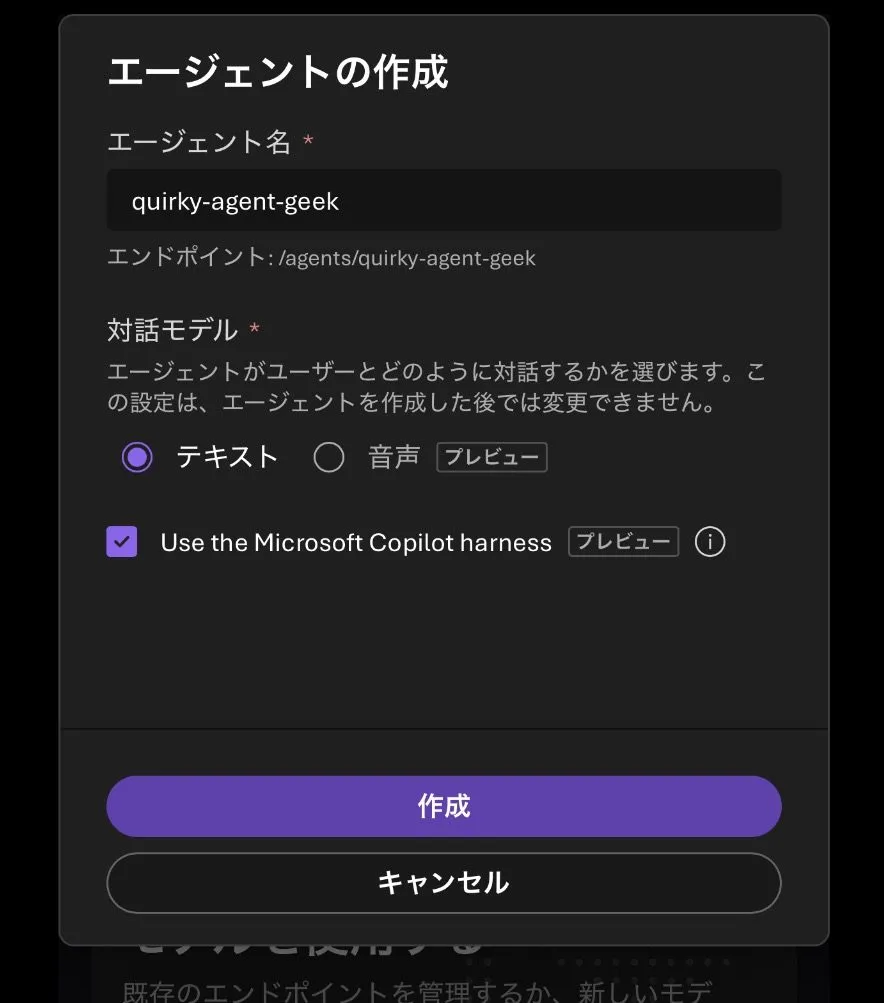
Foundry ポータルから作成すると以下のようにチェックを入れるとこで簡単に作成する事ができます。


![](https://www.geekfujiwara.com/wp-content/uploads/2026/10/IMG_4622.webp)


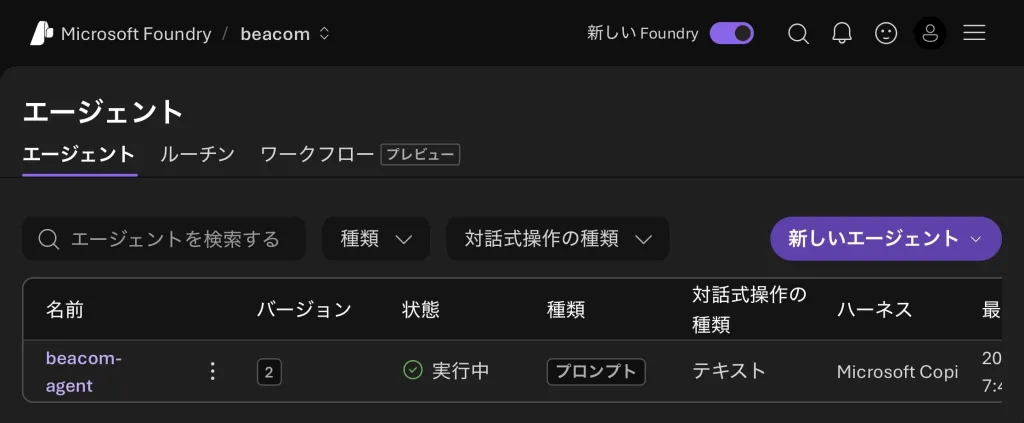
Microsoft Copilot harness が設定されている事がわかります。


![](https://www.geekfujiwara.com/wp-content/uploads/2026/10/IMG_4624-1024x423.webp)


Azure Developer CLI（azd）で、ハーネスを使うプロンプトエージェントを作る流れです。ドキュメントの手順を短くしたものなので、実際に試すときは[手順の全体](https://learn.microsoft.com/azure/foundry/agents/how-to/use-tools-skills-copilot-harness)を見てください。

```bash
# プレビューを有効にする（シェルごと・CI のジョブごとに）
export AZD_ALPHA_ENABLE_AGENTS_MANAGED_HARNESS=true

# プロンプトエージェントを作る
AGENT_NAME="my-harness-agent-001"
MODEL="<推論とツール呼び出しに対応したモデル>"
azd ai agent init "$AGENT_NAME" --kind prompt --agent-name "$AGENT_NAME" --model "$MODEL"
cd "$AGENT_NAME"
```

生成された `azure.yaml` に、ハーネスの選択を足します。

```yaml:azure.yaml
services:
  <agent-service-name>:
    host: azure.ai.agent
    harness:
      type: microsoft_copilot_preview
```

```bash
azd up --no-prompt
azd ai agent show --output json   # kind: prompt と harness.type を確かめる
```

前提として、azd 1.37.0 以降と Foundry の拡張機能、プロジェクトの **Foundry User** のロールが要ります。ポータル（新しい Foundry）なら、エージェントを作るときに「**Use the Microsoft Copilot harness**」を選ぶだけです。

## AI CoE にとっての意味

最後に、AI CoE の立場から見たポイントです。

{.check}
- **同じハーネスが、3 つの場所で動く**：開発者は GitHub Copilot、業務の担当者は Copilot Studio、自社のサービスは Foundry。==使う道具が違っても、エージェントの動き方の考え方（ツール・スキル・サンドボックス・権限）は共通==になります。研修とガイドラインを 1 つにまとめやすくなります
- **スキルが資産になる**：Foundry のスキルはバージョン付きのリソースで、エージェントのバージョンごとに固定されます。業務の手順をスキルとして書きためることが、AI CoE の資産になります。AI ファースト開発標準でも、手順をスキルにまとめています
- **費用の管理は場所ごとに**：Copilot Studio は Copilot Credits、Foundry は Azure の従量課金です。どの仕事をどこで動かすかは、費用の管理とセットで決めます

https://www.geekfujiwara.com/tech/powerplatform/8554/

AI CoE の全体の歩みは、こちらの記事にまとめています。

https://www.geekfujiwara.com/ai-coe/9549/

## まとめ

{.steps}
1. Microsoft Copilot harness（旧称 GitHub Copilot harness）は、モデルの周りでエージェントのループを回す実行基盤。GitHub が作り、GitHub Copilot と Copilot Studio を動かしている
2. 2026 年 10 月 28 日から、Foundry のプロンプトエージェントの実行基盤として選べるようになった（パブリックプレビュー、Japan East も対象）
3. ハーネスのツール（ファイル・シェル・Web・サブエージェント）、スキル、関数、Web 検索、ツールボックスが使え、会話ごとのワークスペースとサンドボックスを Foundry が運用する
4. ハーネス・実行環境・インフラは Microsoft に任せ、自社はスキル（仕事の仕方）と MCP・API（仕事の情報）に集中する
5. 社内の業務は Copilot Studio、自社のアプリ・サービスは Foundry、独自の基盤が要るなら hosted agent
6. シェルは最も強いツール。権限・ネットワーク・接続は自分たちで絞り、トレースで確かめる

==「どのモデルが一番賢いか」より、「モデルの周りをどう作るか」==。その周りの部分を、Microsoft が 1 つの共通の基盤にそろえてきた発表です。

---

### 参考

- [Introducing the Microsoft Copilot harness in Foundry Agent Service（Microsoft Foundry Blog）](https://devblogs.microsoft.com/foundry/microsoft-copilot-harness-in-foundry/)
- [Introducing the Microsoft Copilot harness: Unlocking the potential of truly multi-model agentic work（The Official Microsoft Blog、2026 年 10 月 28 日）](https://blogs.microsoft.com/blog/2026/10/28/introducing-the-microsoft-copilot-harness-unlocking-the-potential-of-truly-multi-model-agentic-work/)
- [Use the Microsoft Copilot harness with prompt agents（Microsoft Learn）](https://learn.microsoft.com/azure/foundry/agents/how-to/use-tools-skills-copilot-harness)
- [Foundry Agent Service limits, quotas, and regional support（Microsoft Learn）](https://learn.microsoft.com/azure/foundry/agents/concepts/limits-quotas-regions#microsoft-copilot-harness-preview)
- [Harnesses in Copilot Studio（Microsoft Learn）](https://learn.microsoft.com/microsoft-copilot-studio/harnesses-overview)
- [Manage costs for agents powered by the Microsoft Copilot harness（旧称 GitHub Copilot harness、Microsoft Learn）](https://learn.microsoft.com/power-platform/admin/manage-usage-github-copilot-harness)
